
Calls
Video call another Second Phone user
Video calls work between Second Phone users. Start one from a contact's profile or a chat; ordinary phone numbers can only be called with audio.
Before you start
- A contact who also uses Second Phone
- A data or Wi-Fi connection
Steps
1Open the contact
Tap Contacts and open the person's profile, or open your conversation with them on the Messages tab.
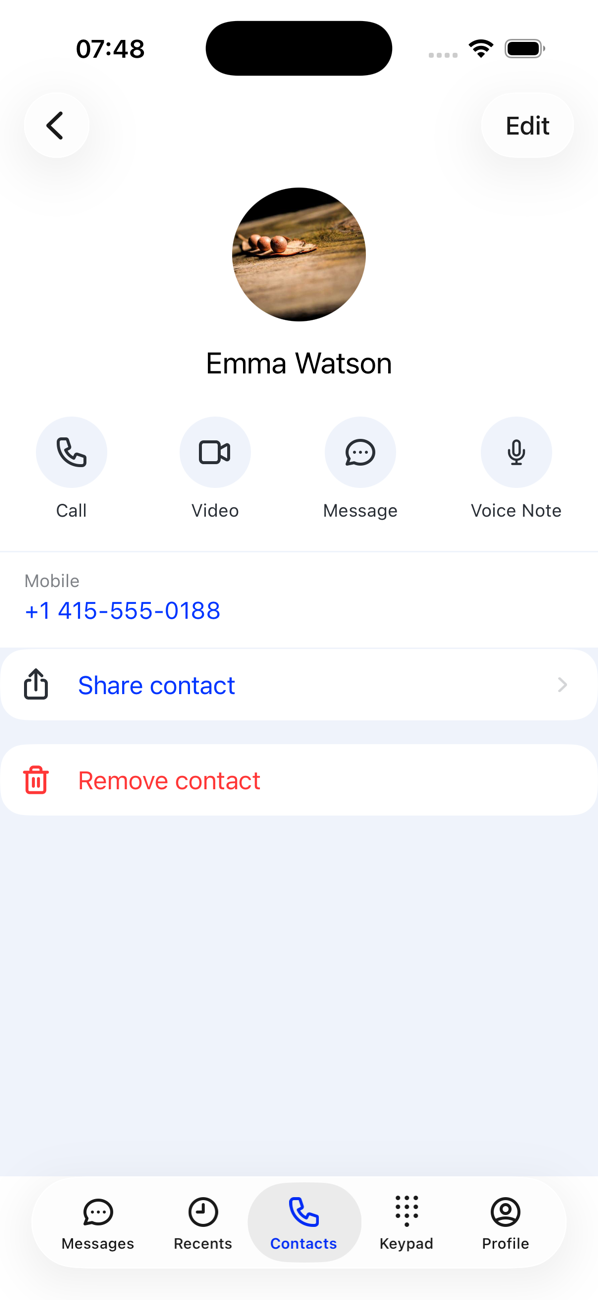
2Look for the Video button
On a Second Phone user's profile you see Call, Video, Message and Voice Note. In a chat, the camera icon at the top does the same. If the person is not a Second Phone user the video option is greyed out and the app tells you Free video calls are only possible to other App users.
3Start the call
Tap Video. The call rings on their phone like any other; when they answer you see each other, with controls to mute, switch camera and hang up.

Good to know
- Ask people you talk to often to install Second Phone: video calls between users do not use the ordinary per-minute call rates.
- Video needs a reasonable connection; on a weak one, an audio call is the better choice.