
Account and settings
Delete your account, or just log out
Logging out keeps everything for next time. Deleting the account removes it and your numbers for good, and does not cancel a store subscription.
Before you start
- A Second Phone account
Steps
1Decide which you need
Logout signs you out of this phone; your numbers, subscription and coins stay on the account and come back when you sign in. Delete Account removes the account and everything on it, including your numbers, and cannot be undone.
2Cancel your subscription first
The subscription belongs to your Apple or Google account, so deleting your Second Phone account does not stop it. Cancel it in your App Store or Google Play subscription settings. See Restore, manage or cancel your subscription.
3Log out or delete
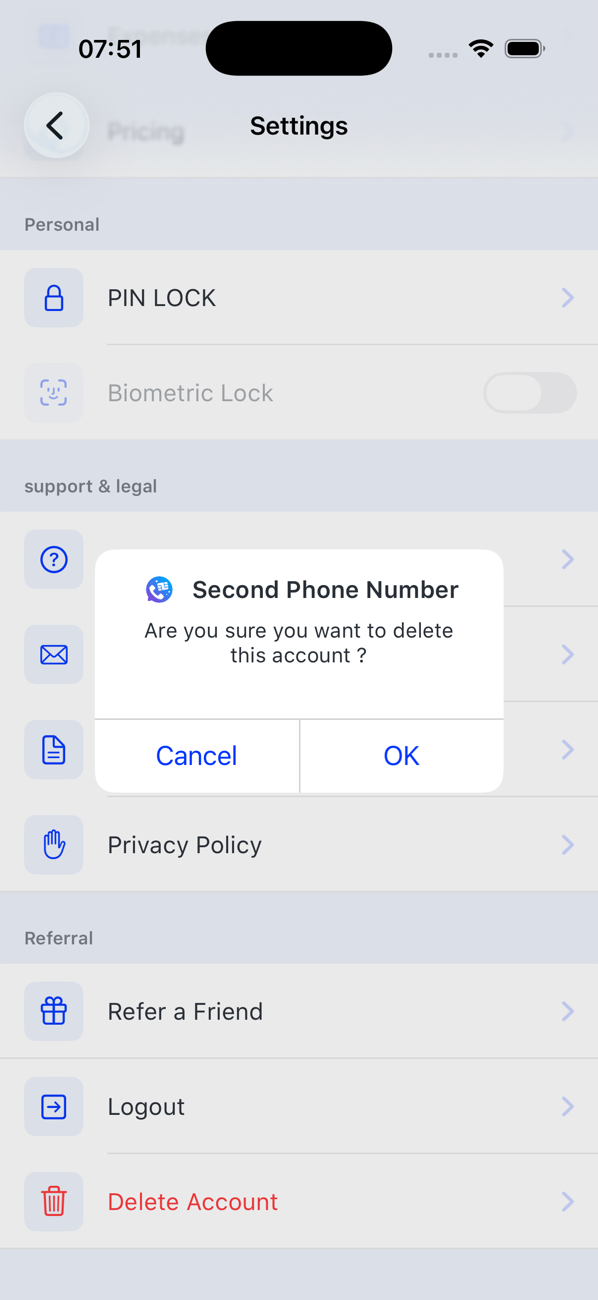
On your Profile tap the settings icon and scroll down. Tap Logout to sign out, or Delete Account and confirm with OK when the app asks Are you sure you want to delete this account?

Good to know
- Numbers on a deleted account are released; if you might want them again, deactivate them instead and keep the account.
- Unused coins are lost with the account.